Learning Objectives
By the end of this unit, you will:
- Understand the shift from static artifacts to dynamic intelligence systems
- Design RAG-powered enablement using the three-layer model
- Build adaptive content that responds to persona and deal context
- Measure enablement impact on deal outcomes, not just downloads
Section 1: The Enablement Paradox
~10 minMore Content, Less Usage
Here's a paradox every PMM encounters: sales teams say they don't have enough content, while simultaneously ignoring the content they have.
The typical enterprise sales team has access to dozens, sometimes hundreds of assets: pitch decks, one-pagers, battle cards, case studies, white papers, ROI calculators, demo scripts. PMMs spend enormous effort creating this library. And yet, reps tell you they can't find what they need, the content is outdated, and they end up creating their own materials anyway.
The Root Cause
This isn't a volume problem. It's a relevance problem.
Static enablement assets are created for generic situations. A one-pager for "the IT buyer" doesn't help when the rep is dealing with a CFO who has specific concerns about integration costs.
The Gap in Action
A rep needs to handle a CFO's objection about total cost of ownership. The battle card covers feature comparison. The one-pager focuses on technical benefits. The case study is from a different industry.
The content exists — but none of it matches the moment. So the rep wings it, or asks a colleague, or loses credibility in front of the prospect.
Section 2: From Artifacts to Intelligence
~15 minThe Three-Layer Architecture
AI enables a different architecture for sales enablement. Instead of static artifacts, you build three layers:
Layer 1: Knowledge
The raw source material. Product documentation, competitive intelligence, customer evidence, talk tracks, pricing guidance. In the old model, this lived in a hundred separate documents. In the new model: a unified knowledge base — organized, tagged, searchable.
Layer 2: Intelligence
The AI-powered retrieval and synthesis engine. When a rep asks "How do I position against Competitor X for a CFO?" — the intelligence layer searches, retrieves, and synthesizes a contextual answer. This is where RAG creates value.
Layer 3: Delivery
The interface where reps consume intelligence. Chat interface, Slack integration, Salesforce plugin, or document generator. Connects intelligence to the seller's workflow where they already work.
What Changes for PMM
Old Model
- Content creation (polished artifacts)
- Artifact maintenance (update 20 docs)
- Generic assets for generic situations
- Training reps to find assets
Intelligence Model
- Knowledge curation (accurate base)
- Knowledge freshness (one update)
- Contextual generation on demand
- System design for auto-surfacing
Section 3: Building the Intelligence Layer
~15 minKnowledge Base Categories
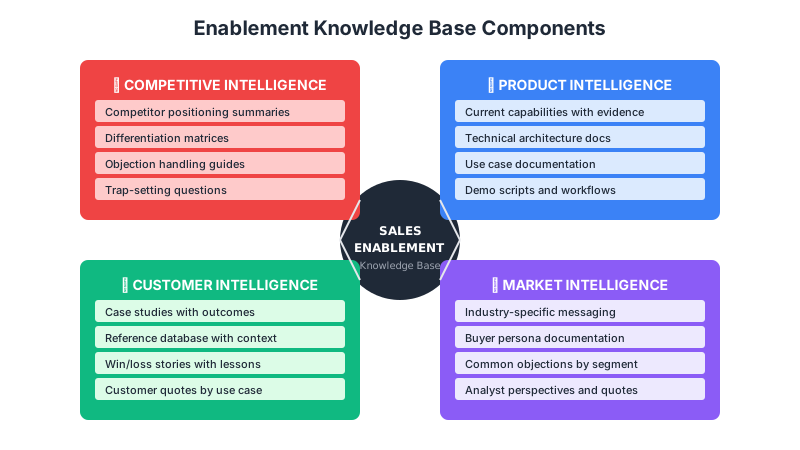
A well-structured knowledge base covers six essential categories:
Product Knowledge
What does your product do? Capabilities, features, integrations, limitations. Source of truth for AI.
Positioning Knowledge
How do you position? Value props, messaging frameworks, persona angles, use cases.
Competitive Knowledge
How do you compare? Feature comparisons, win themes, objection handling, positioning differences.
Customer Knowledge
What does success look like? Case studies, references, outcomes, customer quotes.
Deal Knowledge
What have you learned? Common objections, pricing guidance, negotiation patterns, qualification criteria.
🌍 Market Knowledge
What's happening? Industry trends, buyer priorities, analyst perspectives, regulatory context.
Retrieval + Synthesis
Retrieval Strategies
- Semantic search: Find by meaning, not just keywords
- Metadata filtering: Narrow by persona, industry, deal size
- Recency weighting: Prioritize fresh competitive intel
Synthesis Patterns
- Summarization: Condense sources into briefs
- Tailoring: Adapt content to specific context
- Assembly: Combine into complete artifacts
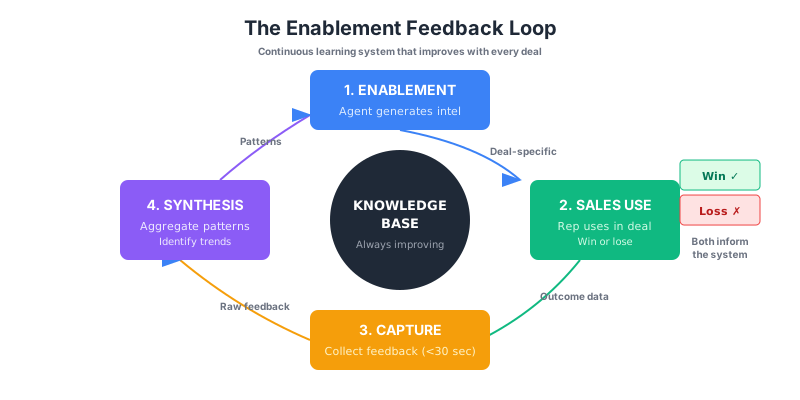
Delivery Integration
Integration Principles
Where reps work: Salesforce, Slack, Outlook — not a separate portal.
Natural interaction: Chat feels intuitive. Ask in your own words.
Proactive surfacing: Surface intel based on deal context automatically.
Feedback loops: Easy to flag wrong or missing intelligence.
Section 4: Adaptive Content & Measurement
~15 minPersona-Aware Enablement
Enterprise deals involve multiple stakeholders with different concerns. The CFO cares about ROI. The CTO cares about architecture. The end user cares about workflow. Procurement cares about compliance.
Adaptive Generation in Action
A rep asks for a one-pager for the CFO at a healthcare company. The system:
- Retrieves the CFO persona definition (ROI, risk, total cost)
- Filters product benefits to CFO-relevant ones
- Pulls healthcare case studies with ROI metrics
- Assembles emphasizing financial value
The same request for a CTO produces different content — architecture, integrations, technical case studies — from the same knowledge base.
Deal-Stage Adaptation
🌱 Early Stage
Category education, problem framing, differentiation messaging. Why this category matters.
Mid Stage
Feature deep-dives, competitive comparison, customer evidence. Detailed evaluation support.
Late Stage
Implementation guidance, references, risk mitigation, commercial terms. Final decision confidence.
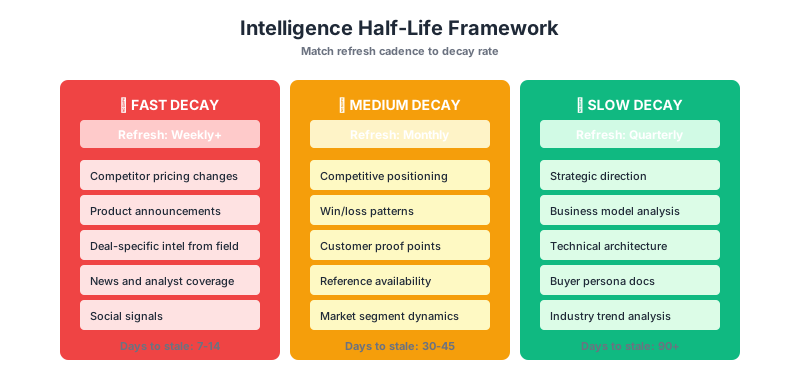
Measuring Impact, Not Activity
Activity Metrics (Avoid)
- Downloads
- Views
- Shares
- Page time
Impact Metrics (Track)
- Competitive win rate correlation
- Deal velocity changes
- Rep confidence surveys
- Knowledge gap identification
Key Takeaways
- The enablement paradox — more content, less usage — stems from relevance gaps
- Three-layer model: Knowledge → Intelligence → Delivery replaces artifact factories
- PMM role shifts from artifact creation to knowledge curation and system design
- Persona and deal-stage adaptation generates contextual content from one knowledge base
- Measure impact (win rates, velocity, confidence) not activity (downloads, views)